
Definitive guide
Shopify vs GoDaddy
Shopify vs GoDaddy Review 2026: The Ultimate Comparison
Which platform actually makes you feel excited to design your site instead of fighting with a rigid system? Setting up an online presence should feel like a creative milestone, not a technical chore. When you strip away the marketing hype, GoDaddy and Shopify both offer incredible paths to getting online, but they treat your design journey in completely different ways. Both platforms want you to succeed; you just need to decide how much design control you want to take on right now.
The Editor
Open the GoDaddy workspace. What do you see? A giant webpage right in your face. If you want to change a title, you do not look for a hidden text box. You just click the letters. You type. Done. The text shifts the box padding on its own. Need a new picture? Click the frame. Upload a file. It updates right there. The left menu stays small. It only controls basic things like your site-wide fonts and primary hex codes. Why does this matter? Because it kills the guesswork. You see the layout exactly how your customers will see it. No surprises. It is built for raw speed.
Now launch Shopify. It handles pages differently. Everything runs through a sidebar stacked with sections and blocks. Sure, you can click an image in the middle of the preview screen to open its settings panel. But you still type your actual words inside the left-hand text field. This setup keeps your text isolated from the core theme layout. Why do this? Simple. It stops your store layout from breaking when an employee updates a product description. Yes, that sidebar gets long when you build a huge homepage. But it stops the page structure from falling apart as your business scales.
Let us talk about layout limits. GoDaddy holds your hand. You can drop in a pre-made review section, but you cannot drag a button into a custom spot if the template blocks it. It keeps the website looking clean, but you give up design freedom. Shopify opens things up. If your theme supports it, you can add a Custom Liquid block to input your own markup. Want to reorder things? Go to the sidebar. Grab the handle on a block. Slide it up or down. The layout changes instantly inside the section.
It comes down to how you like to work. GoDaddy works like a slide presentation. Fast and flat. Shopify makes you work within a structured layout model. It takes an hour to get used to, but it lets a growing store scale without breaking.
Ease of Use
How long does it actually take to go from a blank account to a published homepage? Speed to market matters when you have a business to launch. GoDaddy strips out every conceivable technical hurdle to get you live by lunchtime. You answer three basic questions about your business type, and the automation engine spits out a fully populated website template. The onboarding path is completely linear. You click through a setup checklist that points directly to your domain name settings, your business hours, and your contact info. Why does this approach work so well? Because it requires zero conceptual overhead. You do not need to understand template hierarchies or theme frameworks. You just follow the arrows.
Shopify changes the entire learning curve the second you hit the main administrative area. The dashboard does not start with your website layout. It hits you with an operations panel focused on inventory, orders, and customer data. The onboarding path forces you to think about products before you ever touch a design color. If you just want to build a quick content page, you will find yourself digging through multiple settings menus to figure out where the actual canvas is hidden. It is structured, not intuitive.
Think about your technical tolerance. GoDaddy treats ease of use as a race to the finish line, removing choices so you cannot get stuck in the weeds. Shopify treats ease of use as system organization, making it simple to manage heavy data paths but requiring you to learn their specific nomenclature first. You can easily get lost in Shopify's navigation settings if you just want to link two simple pages together. GoDaddy makes that exact same link a two-click process that takes five seconds.
Ecommerce
How long does it take for you to get ready for checkout? Processing efficiency decides whether you make a profit or lose a customer during a live transaction. Speed is primary factor in business. In all businesses. If you do not meet a customer’s expectation, do not expect them to remember you the next time.
Think about your catalog trajectory. GoDaddy structures its storefront tools for smaller catalogs and rapid deployment, skipping granular data configurations so you can start processing orders quickly. Shopify designs its infrastructure as a dedicated commerce engine, giving you vast capacity to manage thousands of moving stock items but requiring you to learn deep variant and multi-location logistics. You can easily get bogged down in Shopify's structural collection and fulfillment settings if you just need a standard local payment setup. GoDaddy turns that exact same product creation into a direct, out-of-the-box process that requires zero prior database training.
Features
What tools do you actually get inside the main administrative panel? Having the right utilities decides whether you can run your daily operations or if you must pay extra for external services.
GoDaddy wraps its core business features right into the native dashboard. You get a built-in email marketing setup, an automated appointment calendar, and a basic social media content scheduler. Why does this bundled setup work so well? Because every single tool operates under one clear subscription price without any plugin conflicts. You do not worry about background software updates breaking your booking calendar or crashing your contact forms. It provides a complete business toolkit designed to handle client appointments and customer messages right from day one.
Shopify approaches feature design by building a tight commerce foundation and leaving specialized utilities to its App Store. The native dashboard focuses purely on raw transactional tools like multi-channel sales tracking, tax calculation matrices, and automated discount logic.
If you want to add deep email automation, a wholesale customer portal, or custom product review fields, you must look through thousands of external developer apps. What does that mean for your daily management? It means you can build a highly specific operations setup tailored to your exact industry. But this modular system introduces a hidden cost. Every third-party app you connect adds an extra monthly fee, and you have to monitor your dashboard to ensure different app scripts do not slow down your loading speed.
Think about your business model.
GoDaddy acts as a ready-to-use toolkit for service-focused businesses, giving you a pre-assembled set of booking and marketing features that work instantly but cannot be customized.
Shopify operates as an open infrastructure built for product brands, delivering deep transactional scalability but requiring you to manage separate software extensions to unlock your full operational setup.
Pricing
GoDaddy Pricing
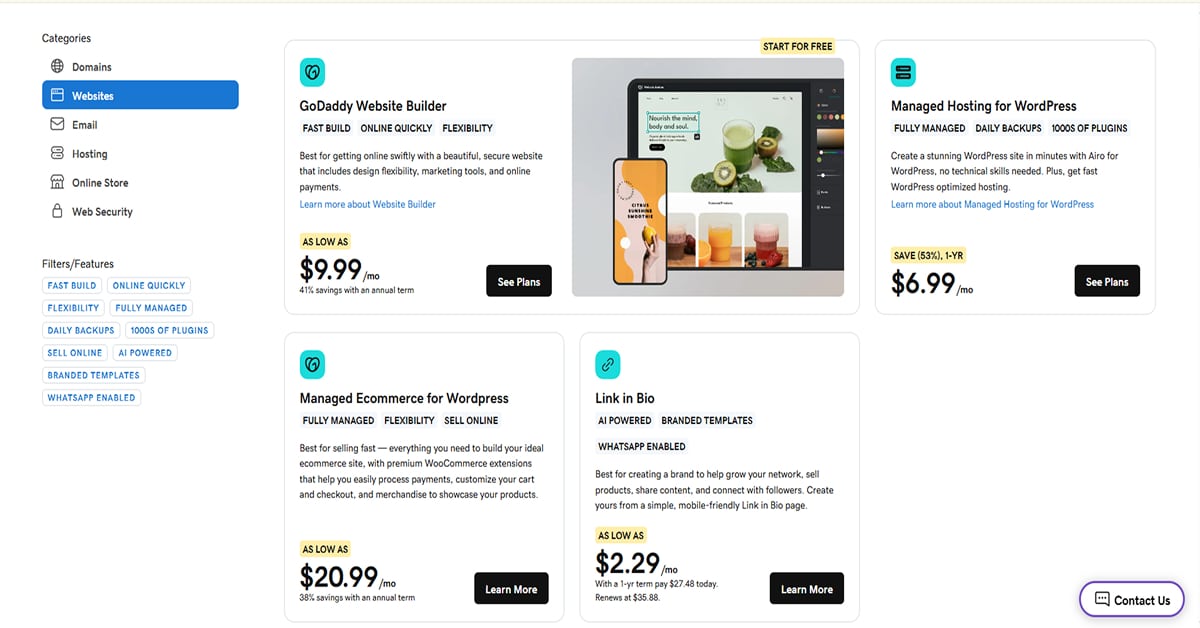
How much cash do you actually have to pull out of your pocket every month to keep the store online? Financial predictability dictates your baseline operating overhead.
GoDaddy hits you with a low entry point to get your site published. Their basic Website Builder starts as low as $9.99 a month if you sign an annual term agreement. This price bundles your website hosting, layout tools, and basic security into one clear bill. Why does this model look so attractive out of the gate? Because it simplifies your early software costs. You do not buy separate hosting certificates or structural framework licenses. But you must read the fine print on renewals. Once that initial annual term expires, the prices jump significantly higher, often doubling your monthly software cost overnight. It is a cheap gateway that gets more expensive down the road.
Shopify Pricing
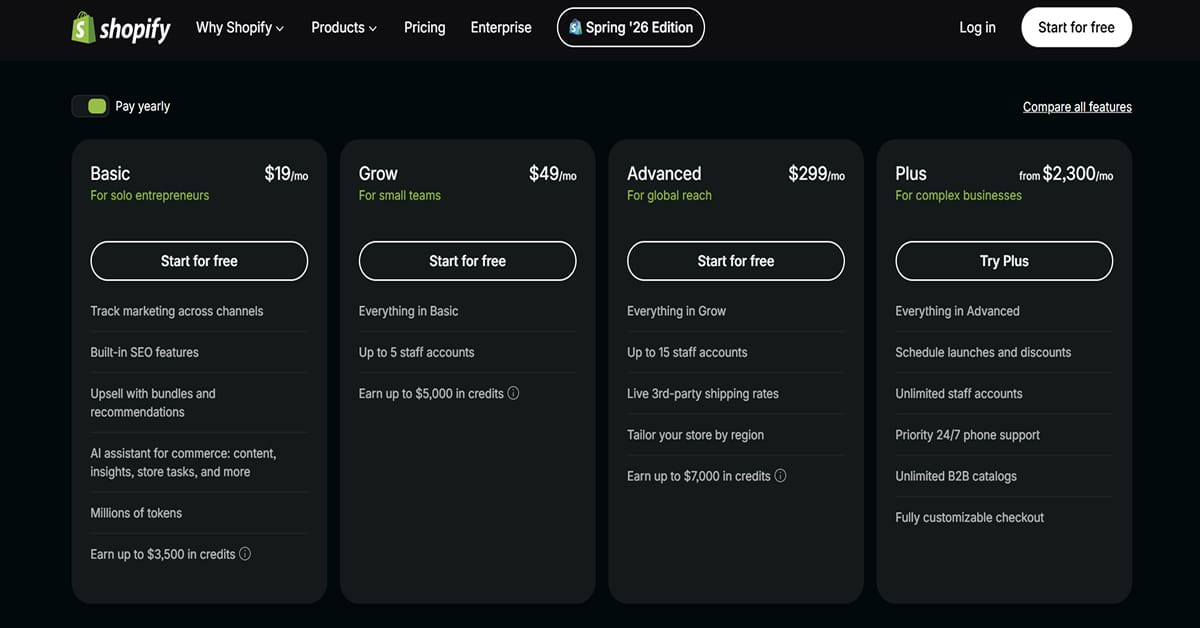
Shopify changes its layout tiers completely with its updated plan structure. If you choose their yearly billing option, the Basic plan starts at $19 a month for solo entrepreneurs. From there, the pricing scales up significantly to the Grow plan at $49 a month for small teams, and jumps to the Advanced plan at $299 a month for global reach. What does that mean for your monthly startup runway? It means your baseline subscription cost climbs quickly as you add staff accounts or need advanced features like third-party shipping rates.
Shopify does not bundle domain registration costs into these numbers. If you need premium theme templates or highly specialized app extensions, your actual recurring monthly cost scales up fast. But you avoid promotional renewal price hikes when your annual contract rolls over.
SEO
How easy is it to actually get your pages ranking on Google search results? Content visibility dictates your inbound organic traffic. GoDaddy keeps your search engine optimization path incredibly basic and automated. They provide a step-by-step SEO wizard that asks you for keywords and then suggests exactly where to place them in your page titles. The blogging interface acts as a simple text editor. You type your post, upload an image, and click publish. Why does this work so well? Because it stops you from overcomplicating things. You do not have to worry about editing robot files or setting up technical site maps. The platform handles the baseline essentials automatically behind the scenes. It is built for a quick content launch.
Shopify shifts the technical control up a massive gear the moment you need to optimize search traffic. They do not just give you a text field; they force you to think about structured data tags and custom URL handles.
Shopify automatically generates your XML sitemaps and structures your collection pages using precise canonical tags to prevent duplicate content penalties. What does that mean for your search strategy? It means you have much deeper control over how search crawlers read your product catalog. But the blogging system itself feels like an afterthought. The native article editor is highly rigid compared to dedicated publishing tools. If you want to create a beautifully styled layout for a review post, you will find yourself digging into the theme file settings or buying an external page builder app just to move a text block.
Think about your long-term traffic strategy. GoDaddy treats search marketing as a quick check box on your daily to-do list, offering a simple setup that covers the basics but limits your technical control. Shopify builds heavy search mechanics straight into its commerce engine, giving you an advanced foundation for huge catalogs but requiring a steeper learning curve to fully master.
Domains & Emails
GoDaddy built its entire empire on domain management, making that specific connection process completely automated when you use their ecosystem. They frequently bundle or heavily discount Microsoft 365 email plans during your initial setup, depending on your region and the specific tier you select. Why is this integration so clean? Because when you buy both your domain and email from GoDaddy, the system configures your MX records automatically behind the scenes. You still have to wait for normal DNS propagation across the web, but you do not have to copy-paste alphanumeric strings to get your mailbox linked to your domain name. It is a highly streamlined workflow.
Shopify treats domain registration as an accessory to its commerce engine. You can buy a domain name directly through their administrative control panel, but they do not provide native email hosting services with inbound and outbound mailboxes. Instead, they only offer basic email forwarding. If someone sends an email to your brand domain, Shopify redirects that message to whatever existing external email address you specify in your settings.
Think about your business infrastructure. GoDaddy operates as a massive registry office that simplifies your domain names, web hosting, and mailbox setup under a single billing account. Shopify functions purely as a transaction engine, giving you an elite online storefront but requiring you to hook up external business communication tools yourself. You must choose between a highly centralized identity setup and a modular network that requires separate email administration.
Customer Support
You hit a critical system bug at two in the morning. Your site drops connections. How fast can you fix it without panicking?
GoDaddy prioritizes a phone-first approach to customer service. They run phone channels alongside standard text chat and a community forum. Why choose this setup? Because it gives you a clear path to bypass reading documentation when your store faces a technical issue. Some people hate reading. I, myself, am one. If your domain fails to connect, you can dial their support line to investigate immediately. You will still navigate automated phone menus, identity verification steps, and potential hold times during peak hours. But it provides a direct voice option for business owners who prefer talking through a problem.
Shopify structures its support portal as an automated self-service funnel before escalating to human contact. Bummer. They offer live assistance, but the interface heavily promotes their automated helper and knowledge base articles when you first submit a request. Do you want this?
You describe your problem, review the automated article suggestions, and request a support agent if you need deeper help. What does that mean for your workflow? It means you typically navigate through a few automated layout prompts before entering the actual live chat queue. It is a web-first setup designed to resolve simple questions through documentation while routing complex issues to their digital queue.
Think about your personal troubleshooting style. GoDaddy emphasizes traditional voice channels to help users handle configurations over the phone. Shopify runs a digital interface that filters standard issues through automated documentation before opening up a direct chat connection. You choose between a phone-first assistance model and an automation-guided web queue.
Final Verdict
Shopify vs GoDaddy? Honestly, it depends on what you need.
For a reason, Shopify is the most incredible platform on the market. It’s ideal for online business as it provides all of the tools required to develop an eCommerce powerhouse.
On the other hand, GoDaddy is great for those that wish to build an online store quickly and don’t require a lot of state-of-the-art sales tools. Overall, it’s a good option if you don’t have the time to spend hours building a store.
Overall, both options have surpassed my expectations, and I would love to see how nicely they work for you too.