
Definitive guide
Divi vs Squarespace
Divi vs Squarespace Review 2026: The Ultimate Comparison
Honestly, picking between Divi and Squarespace isn't even a real design choice. You're just choosing what flavor of software torture you can handle on a random Tuesday. I know.... It's hard to choose. Do you want absolute layout control on an open server where you own every single technical bug? Or do you want to pay Squarespace a permanent monthly subscription fee to stay inside a polished cage where you aren't allowed to break the rules? This review is going to skip the polished ad scripts so you can grab whatever tool actually fits your workflow without making you throw your laptop out a window.
Editor
If you are trying to pick a foundation for your next web project, you have undoubtedly run into the non-stop marketing hype surrounding both Divi and Squarespace. Both platforms promise to make web design incredibly simple, yet they approach the building process from two completely opposite philosophies. Which one actually delivers the performance your specific project needs, and which editor will save your sanity instead of draining your weekend hours?
Divi Editor
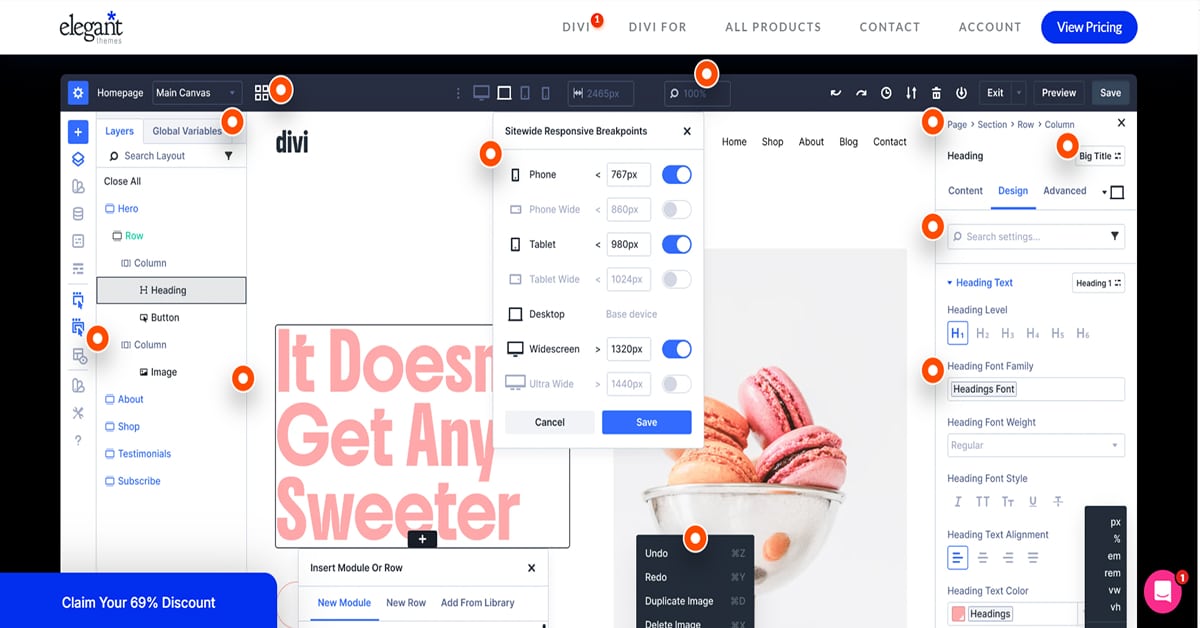
Think about how you work every single day. If you choose Divi, you are jumping right into a front-end visual canvas. You click right on the text in front of you to type. You grab the edges of your columns and drag them to adjust your spacing. If you are a visual thinker, you will probably love this style because you do not have a massive sidebar sitting between your mouse and your layout.
But you have to consider your computer hardware. This fluid setup places more of the editing workload on your browser, especially on complex pages. If you build massive pages, you will experience rendering lag depending on your local machine specs. If you see an element shift out of place while you edit, do not panic. You are likely dealing with a local caching glitch or fluid responsive breakpoints, not a broken theme file. You will also spend extra time hunting down specific margin controls because they pack a huge number of styling options into nested menus.
Squarespace Editor

Let's talk about Squarespace’s Fluid Engine editor. It is a stunning piece of design engineering that will still occasionally make you want to smash your keyboard against the wall. No kidding. I was like that at first… but you’ll get used to it.
When you first open up the dashboard, everything feels great. It’s like a dream. A clean panel slides out from the side, letting you swap out brand fonts, background images, and button stylings in about three clicks. No code, no mess, no headache. It runs entirely on a drag-and-drop grid system. You grab an image block, drag it over, and watch it snap onto a hidden blueprint grid. If you are just trying to spin up a basic corporate landing page by tomorrow morning, the tool feels like an absolute breeze. The system basically acts as a visual guardrail, making it tough for an amateur to build a completely horrific website.
The trouble starts when you actually need pixel-perfect precision. Fluid Engine won't let you glide elements around freely. Instead, objects violently jump between pre-set tracks. If you want to nudge a tiny icon a single millimeter to the left to align it with a custom background shape, you are fresh out of luck. It just snaps to the neighboring grid block, throwing off your visual spacing completely. The grid quickly starts feeling like a cage.
Then you hit the mobile layout setup…. Squarespace splits your desktop and mobile designs onto separate tracks. It sounds great because tweaking a phone layout won't scramble your desktop screen. But the reality is a massive time sink. You are essentially forced to build every webpage twice. You might spend two hours dialing in a desktop page, click the mobile view button, and find your content stacked in a random, vertical mess. Images, headings, and buttons just pile up in the wrong order. You then have to manually drag every single block back to where it belongs. Miss a spot, and your mobile visitors see a broken page.
Ease of Use
When it comes down to daily workflow, how much time do you actually want to spend fighting your layout manager?
Building a page should feel smooth, but the learning curves for these two tools could not be more different. Squarespace banks heavily on its structured grid environment to keep absolute beginners from making layout mistakes. Meanwhile, Divi hands you an open canvas where you control everything, meaning you are responsible for making sure things look right.
Let's look at how these editors actually handle under pressure when you are just trying to get a page published.
Divi
Divi drops you right into an empty page. No sidebars. Nothing blocking your view. If you hate digital clutter, this rules. You literally just click some text and type right there on the front end of your site. It feels like messing around in a basic Word document that magically morphs into a website. But it trips people up. The settings menus do not stay put. They pop up in these floating boxes that drift around your screen while you work. If you like total freedom, you will love it. If floating menus make you furious, you are going to hate it.
Squarespace
Ecommerce
Can you use Divi or Squarespace for eCommerce?
Yes, actually, they're both perfect for it. Let me show you why.
Let's start with Divi.

Divi
Building an online store with these two tools requires completely different strategies, and picking the wrong setup will make you regret starting your business.
Divi pushes you toward a template-driven workflow through its Theme Builder. You use its built-in WooCommerce modules to build a master layout, and then that template automatically rolls out across your entire shop catalog. Easy.
Got hundreds of items? Divi’s approach saves your life. Your store design stays exactly the same without forcing you to click and check every single page one by one. But watch out. Your layout configuration matters. Sometimes you literally have to load the live page on the front end just to double-check that weird product variations aren’t completely broken. It takes real discipline to set up, but it stops huge inventories from turning into total chaos.
Squarespace
Are you wondering if Squarespace's e-commerce setup can actually handle your product inventory without turning into a technical nightmare?
Listed below are some of the more advanced eCommerce features available with Squarespace :
- Subscriptions – You can set up inventory to automatically bill buyers on a weekly, monthly, or seasonal cycle. The platform runs the entire recurring transaction pipeline in the background. It allows you to build a predictable recurring cash flow for physical box deliveries or digital membership programs without adding expensive external checkout plugins.
- Email receipts that may be customized — This is a feature that far too many website builders overlook. Squarespace allows you to personalize the email receipts that consumers get after making a purchase. Customers' email receipts provide an excellent opportunity to thank them or upsell them.
- Product Variations of Superior Quality – You may develop several product variations, each with its own pricing.
- Using Squarespace for Digital Items and Services — You are not limited to using Squarespace only for physical products. You may also sell digital items or accept payments from clients for services you provide.
- Incorporation of ShipStation — ShipStation is a widely used application for printing shipping labels.
- Apple Pay Integration – Squarespace allows you to utilize Stripe as a payment provider, which enables consumers to pay you using Apple Pay on their devices. Apple Pay has been demonstrated to improve the number of successful mobile checkouts (it lets customers authorize payments with only Touch ID).
Keep in mind that you can only start an online shop by choosing the appropriate plan!
Concluding: Both Divi and Squarespace are perfect for eCommerce. Both of them have great modules that allow you to create amazing shop pages.
Features
Both Divi and Squarespace have a lot of features. Honestly, I can't think of any features I would like to add to either one of them.
However, I can imagine you want to know more about what features are included. So here we go.
Blogging
Let's be honest, Divi is the best blogging tool out there. It's great for SEO and has all the features you need to build a successful blog:
- Text blocks
- Image blocks
- Video blocks
- Email options
- ... and so much more
I've built several blogs which have over 1 million annual visitors – all built with Divi.
Contact Form
Enjoy a full-feature contact form builder. Create custom form fields to collect any type of information from your visitors. Hide and display input fields using advanced conditional logic. Style each input individually using a full range of design options.
Photo Galleries
Divi has always been popular with designers and photographers— partly because of their beautiful photo galleries.
- Gallerie styling
- Click-through URLs on images
- Lightboxes
Optin Forms
Build your email marketing lists with Divi's email opt-in module. Divi comes with an impressive range of email provider support, allowing you to build lists on almost any platform. You can even create custom fields, allowing you to build segmented lists and collect unique information from your subscribers. It also comes with GDPR compliance features.
Analytics
Divi has some powerful analytics tools, that allow you to see which buttons or which headlines perform better.
Marketing Tools
Divi is great for online marketing wizards. It comes with some powerful tools:
- Lead generation
- Built in Split Testing
- Conversion Insights
Now let's continue with Squarespace's features.
Squarespace
Now let's continue with Squarespace.
Blogging
Excellent. When it comes to blogging, Squarespace is one of the strongest website builders available. If you're a blogger looking for an easy-to-use website builder, Squarespace is a great option.
Form Builder
My only concern is that form submissions typically need to be connected to a storage or notification option, such as email or another supported destination, depending on how you configure the form.
Photographic Galleries
Squarespace has long been a favorite among artists and photographers, thanks to its stunning picture galleries.
Scheduling Appointments
Appointment Scheduling is available as a separate subscription with multiple pricing tiers.
Analytics
You can also connect Google Analytics, but Squarespace includes its own built-in analytics for tracking website traffic, sales, and product performance.
Members' Only Area
Members Area is available as a paid add-on, and transaction fees may apply depending on your plan.
Pricing
Let's talk about pricing. This might be the variable that could help you choose between Divi and Squarespace.
In my opinion, Divi is the clear winner here. Let me explain.
Divi Pricing
Buying a page builder subscription usually feels like a trap because of arbitrary site limits.
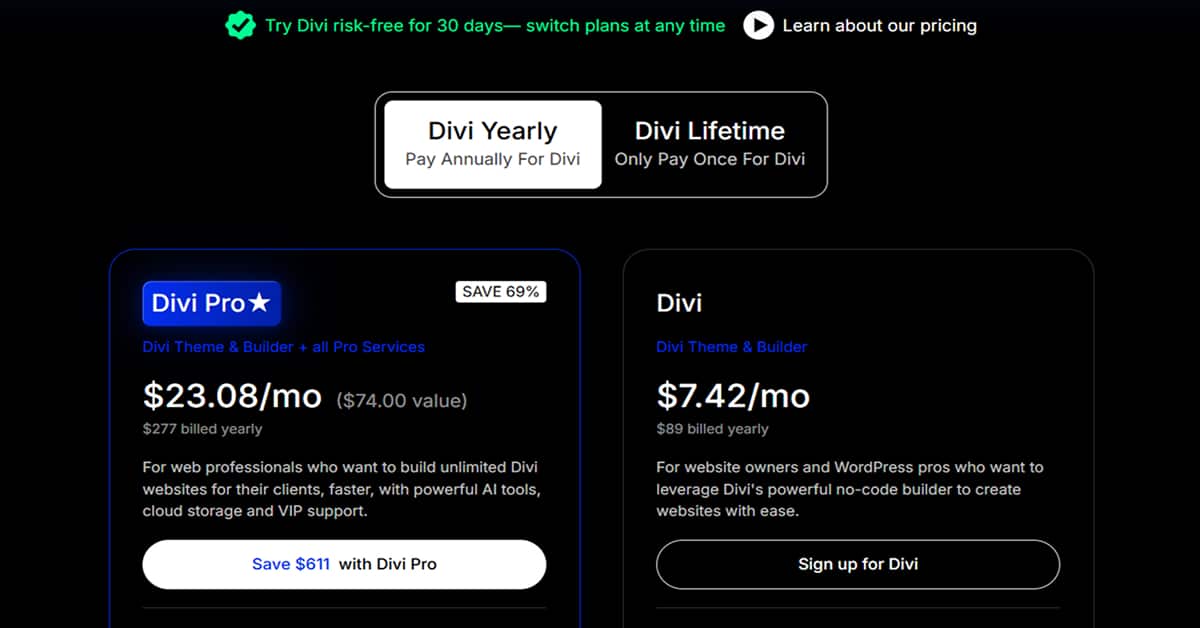
Elegant Themes handles their plans quite differently. It appears that their standard yearly tier costs around $89, which grants full rights to the core visual builder software for an unlimited number of live clients builds. This unlimited policy is a massive distinction. Most competing layout plugins restrict you to three or five installations before forcing an upgrade to a more expensive agency membership.
In our experience, if you actively manage more than three active client portals, the entry price here becomes a direct business asset.
Then you have the lifetime access license. It is a single payment of roughly $249. Pay once. No recurring credit card charges or unexpected annual price jumps down the road. It is suspected that this specific single-purchase option is why freelance designers tolerate the initial software interface learning curves. If you intend to stay in the web design business for longer than two consecutive fiscal years, the upfront lifetime commitment pays for itself almost immediately.
There is an add-on layer to consider though. Elegant Themes now heavily promotes its premium bundle package, often labeled as Divi Pro, which packages the basic theme licenses alongside cloud storage infrastructure and their internal automation writing toolkit. It seems that this advanced package might be unnecessary overhead for smaller agencies.
You do not need the top-tier bundle to access the core framework optimizations or database code rewrites. If you just require the standalone system builder to construct custom page architectures for your current client roster, sticking to the standard base licensing options keeps your operating overhead incredibly low.
Squarespace Pricing
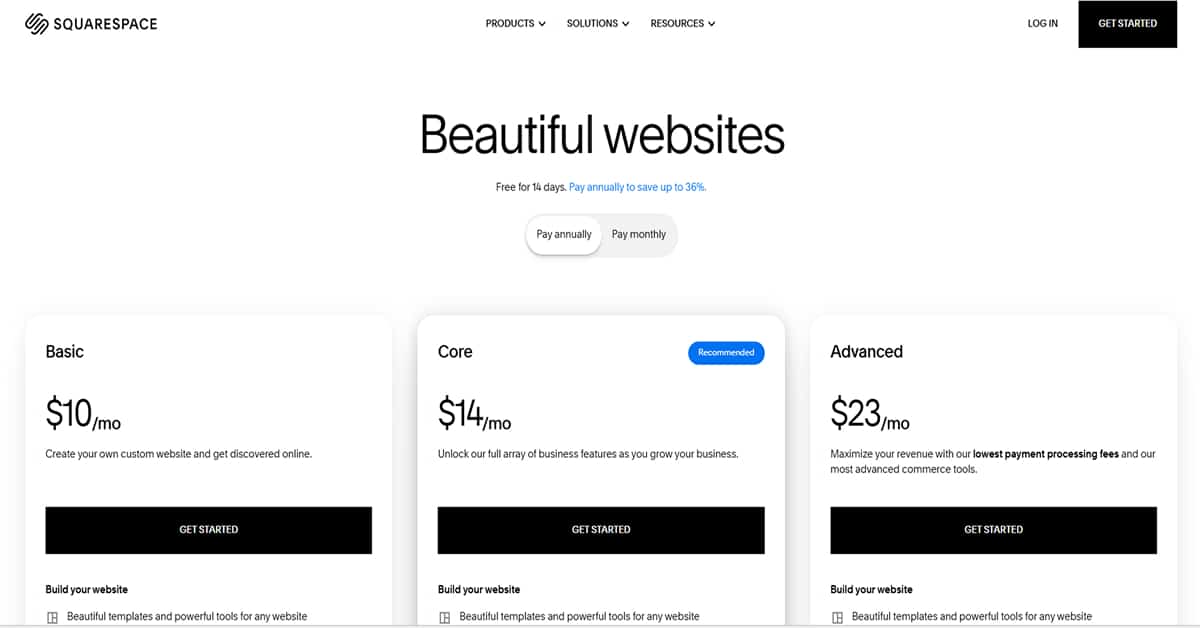
Looking at the options, Squarespace divides its platform into three distinct billing tiers.
The first level is the Basic plan, which sits at $10/month if you sign a contract for the full year. This tier gives you the fundamental layout tools needed to publish a clean profile page or landing screen, but it cuts you off from advanced integrations. Moving up to the Core tier costs $14/ month under an annual agreement. The system labels this as the recommended choice because it opens up the complete collection of business tools and marketing functions to help expand your client lists. The highest tier is the Advanced plan at $23/ month with a yearly commitment. This option is designed to maximize overall transactions by dropping checkout processing fees to the lowest point and unlocking their most complex store mechanics.
SEO
I'm going to keep this short. Both of them are great for SEO.
I’ve been able to rank multiple of my websites to the number one spot in Google for very high competitive keywords. A few of my Divi websites actually get more than 500,000 visitors per year through Google.
Actually, the website you're looking at is built with Divi. And it's getting over 30.000 views per month – all with SEO.
That being said, the same goes for Squarespace. I've seen several big Squarespace websites with millions of visitors per month, all because of SEO.

Search ranking with Squarespace
Think of Squarespace as an automated assembly line for your metadata. You don't have to manually create XML sitemaps or configure many basic SEO settings. The platform runs these processes in the background constantly. You just fill out standard text slots for page headings, link handles, and photo descriptions.
The downside shows up when you need to change advanced code rules. Because Squarespace is a hosted platform, you have less control over server-level settings and advanced SEO customization than you would with a self-hosted WordPress site. It gives a local storefront everything required to rank for regional searches, but blocks custom technical workarounds if you face massive online competitors.
Search ranking with Divi
Divi gives you complete database ownership because it runs on your own WordPress server. Since they rebuilt everything from scratch on a React framework for Divi 5, the builder offers significant performance improvements over earlier versions, although overall speed still depends on your hosting environment and site optimization. This means the layout editor introduces significant performance improvements compared with earlier versions.
To climb search positions, you pair the design settings with external software like Rank Math. Doing this unlocks deep control over search result snippets, indexing commands, and internal link trees. The catch is that you are the system administrator. Even with the fast Divi 5 update, your loading metrics depend completely on your choice of web host, image compression scales, and script order.
Domains & Emails
As many website builders provide a free email, I wanted to cover this in my Divi vs Squarespace review as well.
That being said, I can be short. Squarespace offers a free domain and a free email. Divi doesn't.
Divi however, has a clever solution. In fact, Bluehost, the hosting I recommend for your Divi website, does offer you a free domain and email address.
Just scroll back to the 'How to Install' section to sign up for your Bluehost account.
Customer Support
If you care a lot about good customer support, this could help you make a decision.
Again, Divi is a clear winner here.
Have a look at the Trust Pilot profile of Divi.
Squarespace Support
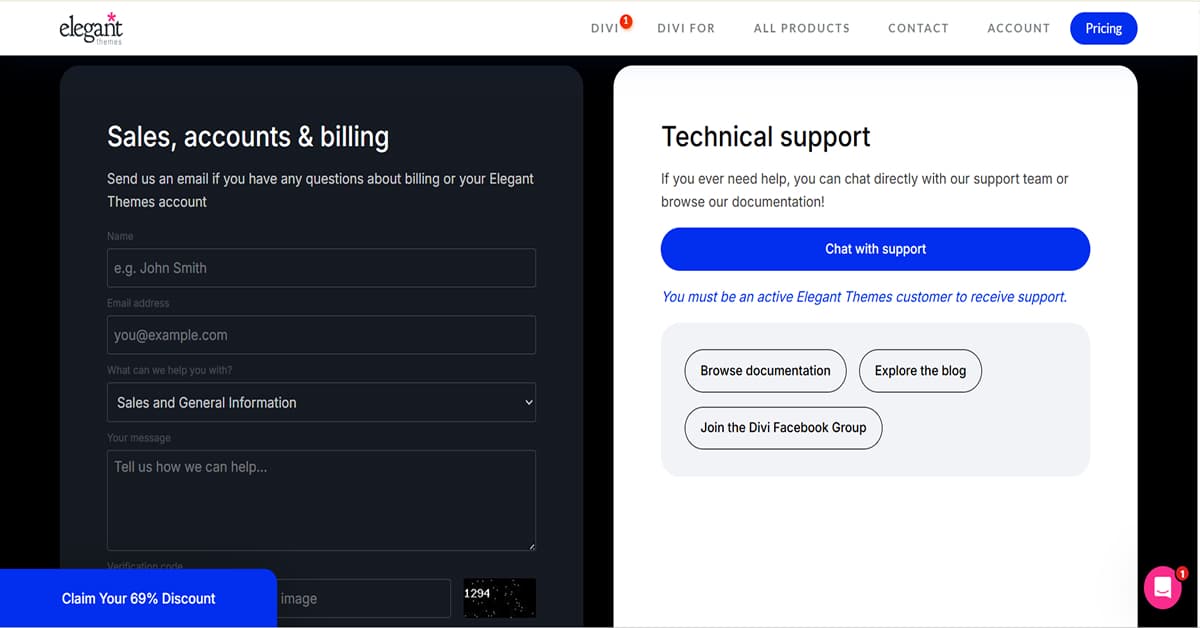
Divi support is a total mixed bag. You get a chat box directly inside your Elegant Themes portal. Thankfully, no automated bots block your path. You connect with real people immediately. Basic layout bugs get handled fast by the lower-tier staff.
But look, deep technical issues will test your patience. Say your Divi builder breaks over a weird server configuration conflict. The front-line agents quickly run out of answers. They just forward your ticket to senior engineers. That escalation process forces you to wait full days for a response. If your client's site is actively down, this waiting game is brutal. It feels like an aggressive push to make you buy their premium VIP support addon.
Your best bet is actually skipping the official queue entirely. The unofficial Divi Facebook groups are completely massive. Thousands of independent web developers hang out there daily. Got a weird styling glitch at midnight? Throw a screenshot into those community forums. Random users will usually solve your problem way faster than the official support desk can. Easy!
Squarespace Support
If something breaks on your live website, Squarespace operates a completely centralized help desk ecosystem.
You can access their 24/7 email ticketing system or log onto their live chat portal during weekday business hours. Because they run a fully managed hosting platform, their internal support team can look directly into your account configuration, subscription billing, and domain registration settings without passing you off to an external company. Amazing! It eliminates the standard tech support runaround because they own the entire infrastructure under your layout.
Final Verdict
In the end, I recommend Divi over Squarespace. Here's how I would summarize it:
- Divi has better customer support. They've got 16,000 reviews and an average of 5 stars on Trustpilot. Squarespace scores a 1.6 out of 2865 reviews.
- Divi is cheaper. A license is valid for unlimited websites, and they even offer a cheap lifetime license.
It's worth mentioning that this doesn't mean Squarespace is bad. It's more about how good Divi is.
I hope you found this comparison helpful – thanks for reading until the end!