
Definitive guide
Weebly vs Squarespace
Weebly vs Squarespace Review 2026: The Ultimate Comparison
Choosing where your website actually lives usually comes down to how much nonsense you are willing to put up with inside the editing dashboard. Let's look at Weebly and Squarespace. If you compare them side by side, it is incredibly obvious they do not share the same target market. One is built for absolute speed, while the other focuses entirely on high-end visual design. Your final choice dictates how much time you waste fighting your software layout menus every single month.
In this Weebly vs Squarespace review, we are going to tear down both platforms to see which layout works!
The Editor
The second you open your workspace, you realize that these two interfaces take noticeably different approaches to page layouts. You shouldn't listen to marketing pitches about how easy they are to use. You need to know how much the system will actively limit your design choices during a late-night edit.
Weebly relies on an old-school, column-locked block system. When you want to add content, you pick up a module from the side tray and drop it into a section. The system instantly snaps that element into a fixed grid line. This rigid setup works great if you are in a rush and just want to keep your paragraphs perfectly straight without thinking about it. The builder tends to produce more structured layouts unless you customize them further. Try shifting an image just a tiny bit or creating an asymmetrical arrangement across your graphics. Weebly simply won't execute those commands natively. More advanced layout changes may require custom CSS.
Squarespace operates on their modern Fluid Engine framework, which provides a flexible drag-and-drop grid system. You can freely reposition elements and create overlapping layouts with much greater flexibility. It feels way more like designing inside a graphic application rather than struggling with traditional content boxes. However, this level of creative freedom requires actual patience during your first week. If you aren't careful with your layout placement, you can easily end up with messy overlapping text blocks or unbalanced spaces.
Mobile customization is another massive differentiator here. With Weebly, mobile customization is more limited because the layout is largely generated automatically. You configure your desktop view, toggle their mobile preview screen, and just cross your fingers that the system stacked your columns in a logical reading order. You have very limited independent mobile editing compared to Squarespace.
Squarespace's Fluid Engine provides additional mobile layout controls, allowing you to adjust positioning and spacing for smaller screens without redesigning the entire desktop layout. Inside this mode, you can move elements around or adjust section blocks specifically for smartphone displays. You definitely have to spend time checking both screens back-to-back to get the alignment straight because the views are still structurally linked. But it gives your business additional mobile layout controls needed to look premium on a smartphone.
Ease of Use
Getting a handle on a new software dashboard depends completely on your team's background knowledge and your overall patience for tweaking layouts.
Do you want to log in, upload your content to a template, and get your pages live immediately?
If that is the plan, Weebly keeps the workflow dead simple. Learning the editor takes very little effort because you only work with a small set of core editing tools. You grab a text block from the side. You drop it on the screen. It locks down right away. The software intentionally limits advanced design options, keeping the initial setup phase fast but much less flexible.
The main trouble surfaces when your company branding needs to break away from those basic structural limits. What happens if you want to build highly customized layouts? How do you fine-tune individual design elements? If you want that kind of design freedom, Weebly leaves you with way less styling tools compared to Squarespace. You want the easiest experience? Then you must work directly within Weebly's structured layout system. The second you try to step past those preset template configurations, the workspace can begin to feel very restrictive for a modern business.
Squarespace handles user onboarding with a completely relative level of complexity. Compare it directly to Weebly's minimal layout. Squarespace introduces a noticeably steeper learning curve. New users may need more time to become comfortable with the interface. Why? Because the interface holds way more styling options and design menus. Many new users spend time exploring the interface before becoming comfortable. You have to actively click around to learn where settings and editing controls are located. It requires actual focus to see how their global styling panels interact with separate page sections.
Once you move past that initial setup phase, maintaining your pages every day becomes a major operational advantage. Why is that? Because the editor gives you real-time visual feedback as you move blocks. The platform becomes incredibly visual. You are not limited to the same rigid column structure found in Weebly. Need to change an image layout? You select the corner handle and shrink the graphic. Want to clone a whole section? You can duplicate it with just a few quick clicks. It demands more effort to master on day one, but it rewards you with a far better long-term workflow without relying on custom CSS for many common design customizations.
Ecommerce
Setting up a digital checkout manager brings an entirely new set of technical hurdles to your daily workspace routine. Do you want to build a serious retail store that scales? If that is your business goal, simply hosting a basic inventory listing is not going to cut it. You have to evaluate how well the dashboard processes actual sales transactions when traffic spikes.
Weebly constructs its entire storefront experience directly around Square's payment and commerce network. Why? Because the same parent company owns both software products. If you are a local seller processing basic credit card sales or setting up a standard inventory catalog, this tight integration keeps things very simple. You log into your screen. You link your Square payment gateway. You list your items. No complex operational configurations required.
The limitations surface immediately when your business model expands past local physical shipments. Weebly offers fewer built-in tools for subscriptions, membership features, and more advanced ecommerce workflows than Squarespace. Think about your goals. What if you need recurring box plans? What if your setup calls for unique download configurations or advanced shipping tracking? If you need those specific workflows, Weebly often requires third-party apps or integrations depending on what you are trying to build. It works fine for small, basic shops. But the overall setup can become restrictive as your business expands.
Squarespace tackles digital retail through a more comprehensive, all-in-one setup. Their framework builds many advanced transactional features right into your dashboard control screen. This structure helps you out by cutting down the total number of third-party plugins you have to install for common ecommerce tasks. Think about a chaotic holiday sales rush. You need to create automatic discounts and promotional offers that trigger right at the checkout screen. You want real-time carrier shipping calculations loading instantly in supported regions and configurations so unexpected postage fees don't ruin your profit margins.
The Squarespace dashboard lets you execute those specific promotions and shipping setups natively. They built specific systems into the platform to manage subscription-based products and memberships. Are you trying to win back customers who walk away mid-checkout? You can set up automated abandoned cart emails to follow up with people who leave items sitting inside their active baskets. The interface takes more manual effort to configure during your first week. No question about it. But it offers a much more integrated and modern ecommerce layout over the long haul.
Features
When you look past the basic layout editors, the actual tools built into the background of these platforms dictate how much manual lifting you have to do yourself. You cannot just count the number of features on their marketing pages. You need to see how they perform when you are actually trying to build out a site's infrastructure.
Weebly gives you a very basic, essential toolkit that covers the absolute necessities. You get an integrated blogging system, native contact forms, a small app store with a few hundred integrations, and standard search engine settings. If you just need a standard business placeholder, these tools work smoothly because there is no complicated configuration process.
The roadblock is development and innovation. Ever since Square took over the platform, the backend feature set has remained largely static. You do not get modern capabilities like automated multi-language translation natively, and the system lacks advanced native analytics compared to modern alternatives. If you want to add dynamic content sections or set up an advanced built-in booking calendar, you quickly feel the lack of platform updates. It works fine for a simple operation, but the ecosystem feels dated as your company expands.
Squarespace operates with a much more comprehensive native toolset by comparison. Their system includes a wide variety of built-in features designed for different business models right inside the main dashboard. Think about what you get without installing external code. They offer deeply integrated systems for client scheduling, restaurant menu management, ticketed event bookings, and private member areas, though availability varies depending on your plan tier.
Their marketing and automation suites are also highly integrated. If you configure their form blocks alongside their contacts tool and email system, you can build custom notification sequences for handling new customer inquiries. Their platform features detailed data analytics dashboards that give you a clear look at your traffic patterns. The software introduces a lot of complex systems to sort through on your first day, but it provides excellent operational flexibility for standard business growth.
Pricing
Let’s talk about pricing. When comparing Weebly vs Squarespace, price is an essential factor to consider. So, which platform is less expensive and which gives more value?
Let’s take a closer look.
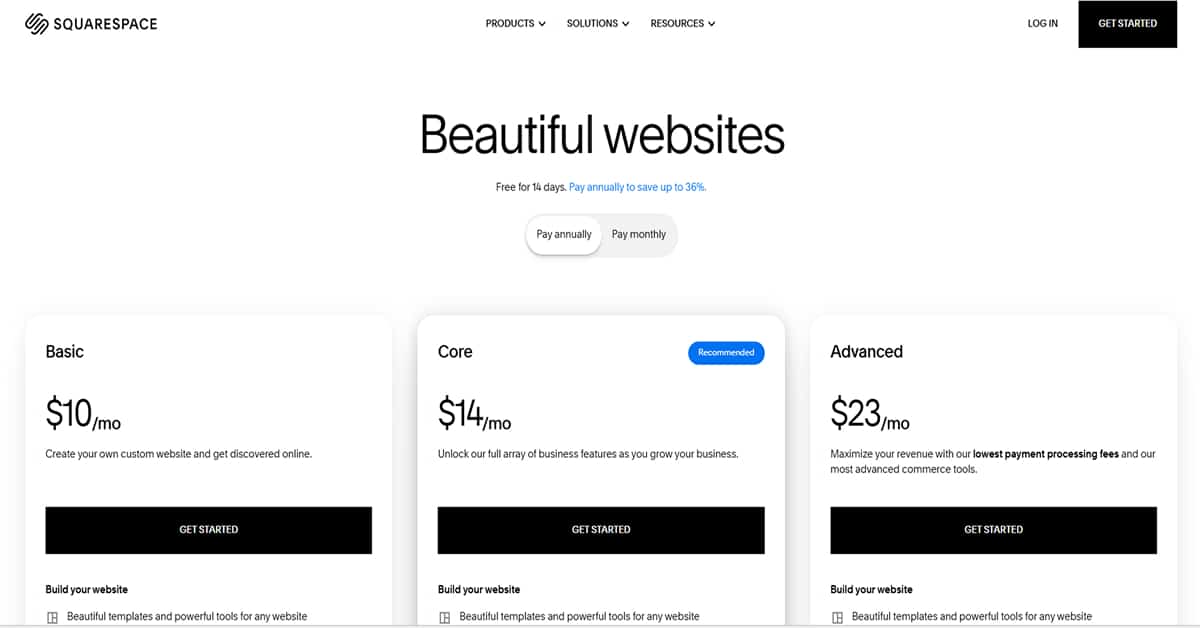
Looking at the options, Squarespace divides its platform into three distinct billing tiers.
The first level is the Basic plan, which sits at $10/month if you sign a contract for the full year. This tier gives you the fundamental layout tools needed to publish a clean profile page or landing screen, but it cuts you off from advanced integrations. Moving up to the Core tier costs $14/ month under an annual agreement. The system labels this as the recommended choice because it opens up the complete collection of business tools and marketing functions to help expand your client lists. The highest tier is the Advanced plan at $23/ month with a yearly commitment. This option is designed to maximize overall transactions by dropping checkout processing fees to the lowest point and unlocking their most complex store mechanics.
Weebly Pricing
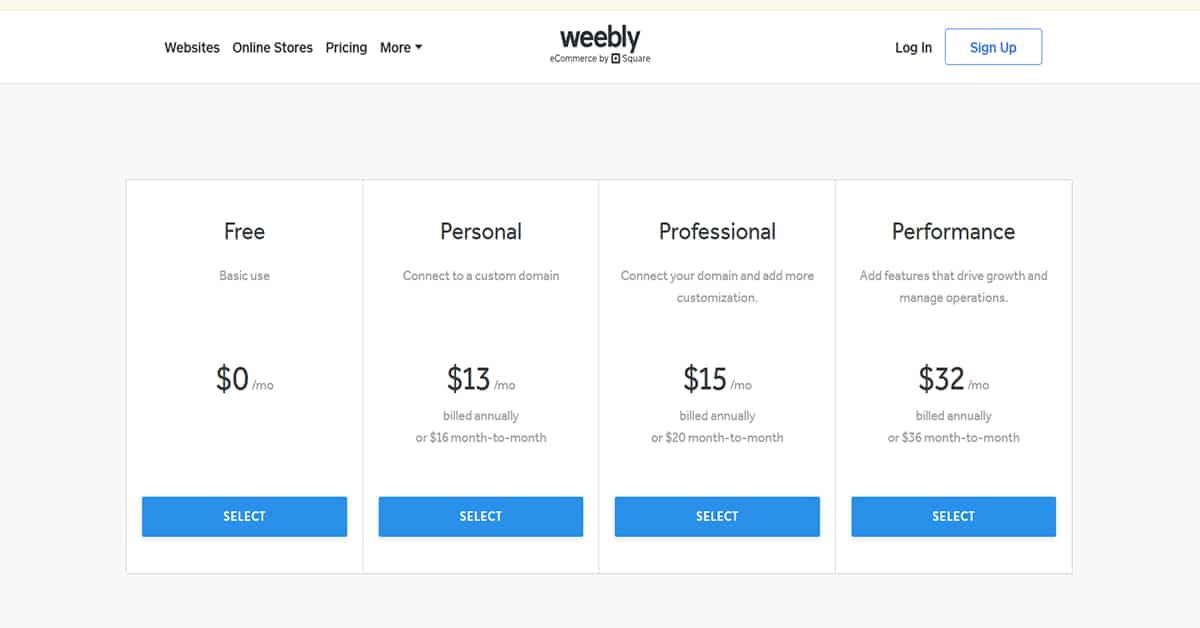
Looking over what a website builder actually costs your company usually brings a few surprises once you calculate the bracket structures. If you keep an eye on your monthly software overhead, Weebly looks like a budget-friendly option at first glance. However, those initial pricing figures hide critical operational limits that will force you to shift your budget around as your website scales.
You can launch a public web page for $0 per month on their Free plan, which publishes your text and layout under a company subdomain. It works fine if you just need a temporary playground to figure out how their design sidebar functions.
The real business discussion begins at the Personal plan level, which requires an investment of $13 per month if you commit annually, or $16 on a standard rolling month-to-month basis. This plan lets your company connect a custom web domain. The main issue here is that the platform refuses to remove its own branded ads from the bottom footer of your pages. For a real business trying to establish trust online, paying a recurring monthly bill while carrying mandatory third-party corporate ads feels totally wrong and pushes most owners to spend more immediately.
To scrub the platform advertisements off your site completely, you have to choose the Professional plan level. That tier costs $15 each month on an annual contract, or $20 on a month-to-month billing cycle. This bracket unlocks unlimited storage capabilities and introduces telephone help channels.
The primary hidden cost involves store transactions. On the lower subscription tiers, the platform takes a 3% platform transaction fee right out of your incoming shop revenue. If your monthly order volume increases, that percentage cut silently eats away your margins. Escaping that transaction fee requires a jump to their Performance plan, which runs $32 per month when billed on an annual cycle, or $36 month-to-month. Upfront, it looks much cheaper than alternative tools, but you have to do your own math to verify if those structural bottlenecks fit your company's long-term plan.
SEO
I’m going to keep this short. Both of them are great for SEO.
Getting your business pages to rank on search networks is where you truly discover the limitations of your builder's core infrastructure. Do you want to build a long-term organic traffic strategy? If that is your goal, you cannot just hope the platform handles search configurations automatically. You need to know exactly how much backend control the interface hands you over your raw metadata and site indexing files.
Weebly approaches search engine tracking through a very basic, traditional setup. The system gives you the necessary options to modify your page titles, drop in meta descriptions, and change individual URL slugs. You log into your page settings. You type out your target keywords. You save the edits. If you are operating a simple local business directory placeholder, these options cover the standard indexing rules fine.
The trouble hits when you try to execute more advanced optimization workflows. The platform organizes your content into rigid, pre-configured file hierarchies. What does that mean for your site? It means you have fewer native options to change your core URL architectures, and its built-in 301 redirect management is more limited than Squarespace's. The automated systems get the basic job done, but the background tools have not received structural updates in years, which can hold your brand back if you rely heavily on content marketing.
Squarespace handles search discoverability through a much more comprehensive technical framework. Their system automatically generates structured data schema and manages canonical URLs for most content types to protect your rankings from duplicate text penalties. The Squarespace workspace lets you manage title profiles and metadata descriptions across your entire library of pages natively inside your primary marketing dashboard panel.
For advanced technical setups, like injecting custom schema markup or manual canonical overrides on specific pages, you will need to utilize their code injection features. They also provide a direct verification tool to link your site directly with Google Search Console, though you will still look at actual impressions and search query data reports on Google's own dashboard. The software forces you to learn how their built-in options map out for web crawlers, but it delivers excellent operational flexibility for building true organic visibility.

Domains & Emails
Securing your own custom web address and setting up business emails is a critical step for branding, but how these platform dashboards handle the backend connections is a completely different experience. You need to look past the initial setup wizard and see how much actual control you get over your technical records.
Many eligible annual paid plans include a free domain voucher for the first year. This integration makes the initial connection fast and painless for beginners.
The main issue pops up when you need to grow your digital footprint or handle professional communication. Weebly does not host emails on its own servers. Instead, they bridge your account over to Google Workspace to create your business inboxes. Weebly's domain and email setup interface is more basic than Squarespace's, while ongoing email administration is handled through Google Workspace. If you ever need to manually update your custom DNS settings, the interface feels less modern than Squarespace's interface. It works fine for the basic configuration, but it can get frustrating if you need to make fast technical updates.
Squarespace organizes its domain registry on a much more modern infrastructure. They also hand you a first-year domain voucher with eligible plans, and linking your brand name to your layout takes just a few clicks.
Just like Weebly, Squarespace points you toward Google Workspace for your custom professional emails instead of hosting them natively. However, the way you manage everything inside the Squarespace dashboard is a complete game-changer for a business workflow. They built a dedicated domain management screen where all your DNS profiles are clearly laid out. It lets you update DNS records from a modern management interface, although changes still require normal DNS propagation time. If you need to add TXT records for domain verification or update MX records for email services, the platform gives you a far more streamlined administrative setup for your brand over the long haul.
Customer Support
Running into an error or a sudden configuration problem in the middle of a business day will immediately test the limits of your website builder's help desk. You cannot run a company based on generic marketing promises about customer care. The only thing that matters is how much effort it takes to get an actual human being to look into your technical issue.
Weebly handles technical assistance through a minimal setup that reflects the platform's focus. Their primary resources include email support, self-service documentation, and additional support options depending on your plan. If you want to troubleshoot a basic bug yourself, you can look through a standard documentation center or submit a thread inside an open community forum.
Think about your account plan. Can you get an agent right away? It can be a challenge. Phone support historically existed for certain packages. But that availability has dropped over time. Now, the option varies significantly depending on your account type and region. If you operate your website on a basic plan, you are stuck with fewer choices when a crisis hits. You have to wait on email responses or rely completely on self-service resources.
Squarespace organizes its support workflow through a centralized dashboard setup. They handle incoming help requests through a guided portal page inside your main account interface. You log into the help console, describe your issue, and select from their primary available support channels. They focus heavily on live chat during specified support hours and email assistance, alongside setup guides and webinars.
The availability of these options shifts depending on your plan, language, and geographic location. The contact flow guides you through a series of troubleshooting questions before directing you to the open support options. Once you click through those verification steps, the layout connects you to their active support avenues to address your brand's technical problems.
Conclusion
Deciding where your website lives comes down to an honest assessment of your current business goals and your overall patience for platform limitations. You cannot look at these two tools as similar options anymore. They serve completely different types of users, and their development paths have moved in opposite directions.